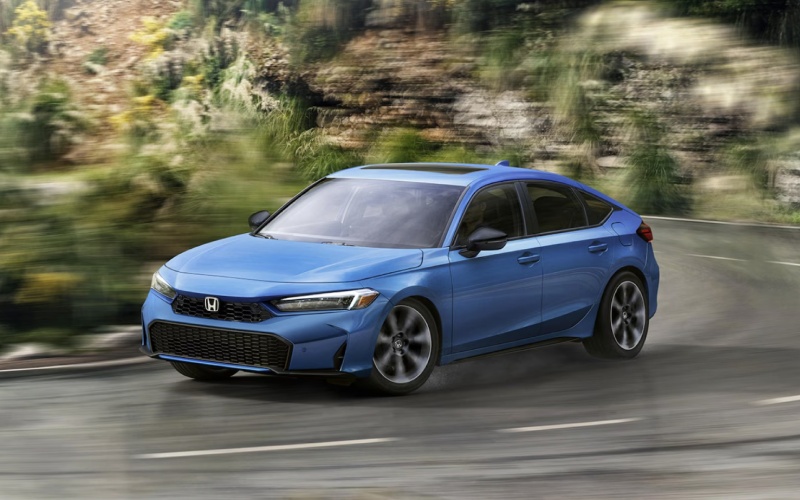
Hayward Honda - 2026 Honda Civic Sedan vs 2026 Maza Mazda3 Hatchback: Which hatchback’s technology fits Bay Area commuting best for Union City, CA?
When we compare today’s compact hatches, one question rises to the top: which model gives you the most seamless, everyday tech without adding complexity? For many Union City, CA commuters, the yardstick is simple—voice-first navigation, quick pairing, uncluttered menus, and a display you can read at a glance when the traffic pattern shifts near the Dumbarton or I-880. That’s where the 2026 Honda Civic Hatchback’s Google built-in integration and straightforward interface set a high bar compared to the 2026 Mazda Mazda3 Hatchback’s more minimalist, controller-centric approach and Alexa Built-in.
Let’s start with the fundamentals. On upper Civic trims, Google Assistant handles navigation, calling, and reminders by voice, while Google Maps keeps live traffic front and center on a vivid 9-inch touch-screen. It pairs naturally with wireless Apple CarPlay® and Android Auto™, so you can alternate between native Google apps and your preferred ecosystem in seconds. Mazda3 offers Apple CarPlay and Android Auto as well, plus Alexa Built-in for voice commands, but the central screen is built around the Mazda Connect controller, emphasizing fewer touch gestures. That design feels sleek, yet it can demand more hand movement and menu rotations when you just want to pinch, tap, or swipe. If your daily loop includes rapid lane choices and split-second detours, fewer steps can make for a calmer drive.
How the interfaces feel on real roads
Union City, CA drivers juggle quick merges by Alvarado-Niles, sudden slowdowns near the I-880 connector, and frequent last-minute errands. The Civic’s touch-forward layout with big tiles, large fonts, and responsive voice control encourages fast, confident inputs. It’s also easy to hand off the screen to a passenger without explaining a rotary dial. Mazda3 counters with polished visuals and a reduced-distraction design; some drivers prefer the tactile certainty of a knob over touch. Both vehicles work, but if you like to jump between podcasts, messages, and maps with as few steps as possible, the Civic’s approach tends to feel more direct and adaptable.
Audio and phone integration are neck and neck: each offers a Bose premium sound system on higher trims, and both support wireless smartphone mirroring. What separates the Civic is how naturally those features integrate with Google built-in. Ask Google Assistant to find a coffee stop along your route, send a text, or adjust your destination—then see the same guidance mirrored across the instrument cluster and central screen. The fewer times you need to look away from the road or work through submenus, the better the experience in dense Bay Area traffic.
Driver-assist tech in the East Bay flow
Safety and driver assistance are essential for this comparison too. The Civic’s Honda Sensing® suite includes Adaptive Cruise Control with Low-Speed Follow and Lane Keeping Assist System with Traffic Jam Assist, ideal for the accordion-like rhythm on I-880. Mazda3’s i-Activsense® suite is similarly comprehensive, and available Cruising & Traffic Support brings lane centering and headway control in specific scenarios. Both vehicles aim to reduce effort and enhance awareness. The deciding factor often comes down to how the systems are presented on screen and how intuitively you can adjust them mid-drive—again a place where the Civic’s simple menu structure and clear status graphics resonate with many commuters.
Small touches shape daily satisfaction. The Civic’s Walk Away Auto Lock® feature means you can step out, shoulder your gym bag, and keep moving—no fumbling for the fob. The side-pull cargo cover saves an extra reach when you’re parked tight at a curb. And if you opt for the hybrid, deceleration selectors let you tailor regenerative braking for a more one-pedal-like feel in slow traffic. Mazda3 brings its own thoughtful details, like available 360° View Monitor for tight parking and an elegant cabin ambiance. But when you map those details against a frequent-stop, tech-heavy commute, the Civic’s conveniences align closely with what most Union City drivers actually use day in, day out.
Who should choose which?
If you appreciate a minimalist cabin with a rotary controller and you want the option of AWD or a high-output turbo, the Mazda3 Hatchback remains very compelling. Drivers who want a modern, voice-led system with the convenience of a responsive touch-screen and highly integrated Google services will likely find the Civic Hatchback’s interface faster to learn and easier to live with across unfamiliar routes, changing schedules, and that sprint to beat the metering lights.
In short, both cars do technology well—but they do it differently. For commuters who value fewer steps and more natural voice flow, the Civic’s approach to infotainment and driver displays often wins the day. If you enjoy a design that nudges you to set and forget, the Mazda3’s ethos might fit your style. The best answer is the one that feels least distracting and most intuitive during your own commute.
Quick decision checklist
- Voice-first navigation and apps: Civic’s Google built-in vs. Mazda’s Alexa Built-in approach—prefer the ecosystem you use most.
- Screen interaction style: Touch-forward Civic vs. controller-centric Mazda3—decide which feels natural in traffic.
- Display clarity and info layout: Both are crisp, but the Civic’s large tiles and direct menus can reduce steps mid-drive.
- Pair your phone in each vehicle and run your normal mapping and messaging apps.
- Test voice commands you use daily—set a calendar reminder, search for a coffee stop, send a text.
- Toggle driver-assist features and check how quickly you can confirm settings on screen.
Frequently Asked Questions:
Does the 2026 Honda Civic Hatchback support Google Maps natively?
Yes. On Sport Touring Hybrid, Google built-in provides native Google Maps, Google Assistant, and access to apps via Google Play, alongside wireless Apple CarPlay® and Android Auto™.
Can the 2026 Mazda3 Hatchback use wireless Apple CarPlay and Android Auto?
Yes, wireless smartphone integration is available on select trims. The interface is designed around the Mazda Connect controller, with Alexa Built-in for voice commands.
Which is easier to use in stop-and-go traffic?
Both systems work well, but many commuters find the Civic’s touch-forward screen and Google built-in voice control take fewer steps for common tasks like re-routing or quick messages.
Do both offer premium audio?
Yes. Each model offers a Bose premium sound system on higher trims for clear, immersive audio.
Ready to compare on your own route? Visit us at Hayward Honda for a tailored tech demo and a back-to-back drive that mirrors your daily loop. We’re proudly serving San Lorenzo, Castro Valley, and Union City with knowledgeable product specialists who can help you pick the setup that fits your commute best.